













home beginners cvs publix walgreens grocery deals restaurants publicity
Showing posts with label Beginners. Show all posts

Wednesday, September 30, 2009

Guest Post - Understanding the Coupon Language


joshuawillis


This post is part one of My Frugal Adventures's Welcome to Coupon World!!
I know some of the acronyms and the lingo can seem crazy so hopefully this reference guide will help you navigate my posts! Trust me when I say that it gets easier and easier as you go along. If you still have questions just leave a comment below because I am sure lots of other people have the same question you do!

BOGO or B1G1: That is a Buy One Get One sale. I usually spell this out so it is clear.
You might occasionally see B1G2 which is just a Buy One Get 2 free sale and so on...
.
FAR: Free after rebate! If an item is $2.99 and you can send off a rebate for $2.99 that item is FAR. We also love to combine FAR items with coupons to make a little profit (and cover the cost of the stamp!)
.
SS/RP/P&G: This simply refers to my good friends the coupon inserts (which you will find in the Sunday paper). Each insert is from a different company Smart Source, Red Plum and Proctor and Gamble and they change from week to week. You can see exactly how to tell the difference HERE.
.
OYNO: On Your Next Order. This is usually used in reference to a catalina coupon. Often times if you get a catalina coupon or a gift card (like at Target) you can not use it on the same transaction- you can use it OYNO.
.
Catalina: I have a much longer explanation HERE but basically a catalina is a little coupon that prints at the cash register. It can be an actual coupon or it can be for a dollar amount off your next transaction. Catalina is simply the name of the company that makes these machines. You will ALWAYS want to check the catalina machine at your stores because you never know how much money you are leaving on the table by forgetting these little papers.
.
Peelie: This is a coupon that is stuck to the front of an item and can be peeled off. You can see an example of a peelie HERE- see the little sticker that says Free? These are usually coupons but can also be rebates.
.
Blinkie: The little machine you might see at the grocery store that spits out coupons. Grab the blinkies when you see them. They are typically available when an item is at the highest price. Just hold those blinkies for a sale!
.
MQ: Manufacturer coupon. (MFR as well)
.
OOP: This is your out of pocket expense. We are always trying to reduce the OOP by using gift cards, rebates, Register Rewards, store coupons etc... The bottom line is to keep your money in your pocket!
.
Rolling: This is when you use a gift card or catalina to pay for another transaction and get yet another catalina. For example, if you buy 2 boxes of cereal at Target and get a gift card for $2 back- you might want to "roll" the gift card by buying 2 more cereals- use the gift card to pay and get another gift card and on and on...
.
Stockpile: This refers to whatever you are able to stock up on at dirt cheap (or free) prices so you don't ever have to pay full retail again. You might have a stockpile of 6 boxes of cereal that you bought with coupons and a sale for .25 a box. Since you have multiple boxes you never have to pay $3 or more for cereal again since you have enough on hand to get by until the next sale.
.
Stacking: This is when you use a store coupon and a manufacturer coupon. For example, you can use a Target coupon for a specific item as well as a manufacturer coupon on the same item (so 2 coupons for the same product) to double your savings.
.
MIR: This is a mail in rebate offer.
.
TMF: A type of rebate that allows you to Try Me Free. So the manufacturer will refund your full purchase price- often times you can also use a coupon and still get reimbursed the full retail price of the item. This is different than a Money Back Guarantee as that rebate requires you to be dissatisfied with the product to get your money refunded.
.
Register Rewards: The catalina program specific to Walgreens. Read more about it HERE.
.
WAGS: Walgreens
.
ECBs or EBs: CVS's store program. Extracare bucks are awarded for specific items you purchase and can be used like cash on virtually anything in the store. See my CVS posts HERE and HERE.
.
YMMV: I rarely use this abbreviation as it confuses people but it means Your Mileage May Vary or Your Market May Vary. Basically it refers to deals like a clearance find might be YMMV because not everyone is going to get the exact same clearance deals. It can also mean your luck with your cashier may vary- for example x is priced at $.99, use $1.50 coupon to get $.51 overage- YMMV. So basically if you get a stinker cashier they will refuse the coupon and you are out of luck. The same person can be in the next check stand and get the overage, so YMMV.
.
So the bottom line is what does this mean:
Kellogg's Cereal $1.50
Use $1.50 from 8/9 SS
Final Price: FREE
.
That means to go look in your Smart Source coupon insert from the weekend of 8/30 and cut the coupon for Kellogg's for $1.50 to get your free cereal.

Monday, September 28, 2009

Coupon Printing Tips


Check out Being Frugal is Fabulous's post Here on Coupon Printing Tips.


Friday, September 25, 2009

When Your Cashier Says No Part 2


Shannon has part 2 of her original post, "When your cashier says no" You can see it Here.
(Part 1 is Here.)

Thursday, September 17, 2009

When Your Cashier Says No


Shannon at For the Mommas has a neat post Here - When Your Cashier Says No!

Earn Money Shopping Online

Ebates is a great tool for shopping online. You know you are going to do it! You found that amazing deal! By shopping through Ebates, you are able to get a percentage of your purchase back. For example, if I were to shop at Nordstrom, I could make 3% of my purchase back. Stores and store locations vary, but when shopping online it is pointless to go straight to the website where you are buying an item - shop through Ebates instead (the site redirects you right to the online store of your choice - crediting your account after a purchase is made.)
...

Similar to Ebates, Cashbaq also offers a percentage of your spending back. I always check both sites to see what site offers the largest percentage back for the store I am shopping in. Go Here to get started and make $5 just for signing up.

...

Guest Post - For Beginning Couponers

If you're anything like me, when I was first exposed to the world of budget saving couponing, I was so overwhelmed that I didn't know where to begin. I started once, thought it was too difficult and quit. I didn't think you could truly save the money people said they could, and it definitely didn't seem to be worth my time. However, I have now discovered that it does work and I can save more money than people said you could save.

Some basic budget saving principles to follow are using coupons when items are on sale, stocking up on items that you frequently use and going to more than one store for your purchases. Often I buy the smallest rice, diaper package possible because I am more likely to get that item free. Most stores allow you to stack coupons. That means that you can use a store coupon and a manufacturer coupon on an item that is on sale and often get that item for pennies or even better for free. When I first began couponing, I learned how to coupon at one store at a time. Some stores can be confusing at first, but I have posted the basics for each of the stores that I have learned to coupon at. Coupons really can help you save much money and live within your budget.

To help those of you who are new with this, I've come up with a Weekly Plan to ease you into couponing and explain some things along the way. I hope you enjoy and start saving money.

Week 1 - Getting Organized
* Buy a Sunday paper. Cut out ALL of the coupons. This may seem overwhelming, and you may think - why do I need all of these? Start by clipping all of them because you'll be surprised at the coupons you can use and then get paid for buying an item that you had already gotten for free. Since you don't know which ones of these there are yet, clip all of them.
* Print all coupons from bar in the left column. (You can click "See all Coupons," then select to print all.) (You can also print coupons from SmartSource.com and Redplum.com)
* Buy a 3 ring binder, baseball card holders, and dividers. Click here and here to see how to organize this notebook.
* Unless you're Superman or Wonder Woman - don't try and shop this week.

Week 2 - Get Started (Rite Aid and 1 Grocery Store)
* Buy a Sunday paper. Cut out ALL of the coupons. For reasons why see week 1.
* Print all coupons from bar in the left column. (You can click "See all Coupons," then select to print all.) Check back at Smartsource.com and redplum.com to see if there are any new coupons to print.
* Using Budget Saving Mom's deal finders (the drugstores should be published Sunday/Monday, and the grocery store deals will come out Monday/Wednesday/Thursday), pick a drug store and one grocery store to go to. I would suggest starting with Rite Aid because they are the easiest to follow. To see Rite Aid's policy click here. For a list of all store policies and budget saving tips, click here. REMEMBER YOU HAVEN'T STOCKPILED VERY MANY COUPONS YET, SO YOU MAY NOT BE ABLE TO GET ALL THE DEALS THAT ARE LISTED. BE PATIENT, WITHIN 3-4 MONTHS, YOU SHOULD BE ABLE TO GET THE ENTIRE LIST OF DEALS.
* BEFORE going to the stores, get two envelopes and label them with the names of the stores. Print the deals from Budget Saving Mom's site that you plan on buying. Pull the coupons that correspond to the deals that you will be getting and put them in the envelope. You can still bring in your notebook and search for additional deals after you have gotten the items from your list in your cart (or stroller if you are like me.)
* Since you're new at this and until you have a good idea of how much you should pay, limit yourself to buying only items that are free, less than a dollar after coupons, and things that you are pretty sure you will use. Remember, when you're buying an item that you can get multiple sizes of, get the smallest size you can to maximize the amount of money you will save. (For example if you have a $1 off coupon for a body wash, buy the 4 oz. one that costs $1.25 as opposed to the $3.50 8 oz. one).

Week 3 - Rite Aid and another grocery store
* Buy a Sunday paper. Cut out ALL of the coupons.
* Print all the printable coupons on the sidebars.
* Go to your drug store from last week. And using Budget Saving Mom's deals that are listed, pick the best money saving grocery store for this week to go to.
* Do the same as last week. Print your list, highlight which items you're getting, and put your coupons in an envelope and bring your list. Also, bring along your notebook for any extra time you may have to find other deals.

Week 4 - CVS and a grocery store
* Buy a Sunday paper. Cut out ALL of the coupons.
* Print all the printable coupons on the sidebars.
* Try out CVS. When you get into the store, don't forget to get a CVS card BEFORE you make your purchases. To see how CVS works, click here. Limit yourself to only purchasing those things that you can get Extra Care Bucks back and that will then turn out to be free or moneymakers.
* Also, pick the grocery store with the best deals for this week, print your list, pull your coupons and envelopes and hit the road. Print your list, highlight which items you're getting, and put your coupons in an envelope. Also, bring along your notebook for any extra time you may have to find other deals.

Week 5 - CVS again with extra care bucks and a grocery store
* Buy a Sunday paper. Cut out ALL of the coupons.
* Print all the printable coupons on the sidebars.
* Do CVS again, this time you can spend some of those Extra Care Bucks, but make sure that you are also purchasing something that will replenish your Extra Care Bucks stash.
* Pick your grocery store to shop at. Print your list, highlight which items you're getting, and put your coupons in an envelope and bring these items with you. Also, bring along your notebook for any extra time you may have to find other deals.

Week 6 - Walgreens
* Buy a Sunday paper. Cut out ALL of the coupons.
* Print all the printable coupons on the sidebars.
* If you're feeling bold, you can try out Walgreens. Click here for instructions on how to save at Walgreens.
* Pick your grocery store. Print your list, highlight which items you're getting, and put your coupons in an envelope and bring these items with you. Also, bring along your notebook for any extra time you may have to find other deals.

So, there you go - you're 6 weeks into this, your stash of coupons should be building, and you should be saving money!

For additional information:

1. Stocking Up (buying more than you need right now to save later)- a new way of shopping.
2. Balancing Coupons with Life: part 1, part 2, part 3
3. A Newbie Success Story
4. Store Policies
5. Additional ways to get coupons
6. Budget Saving Tips when shopping
7. Budget Saving Freebie Tips

For even more tips including how to organize coupons, click on basics for beginners on the right side of the site.

Rene and Karen
Budget Saving Mom
http://www.budgetsavingmom.com/

Tuesday, September 15, 2009

Guest Post - Tutorial 3 HCW Trading Program

This is the third post of three from Lori at Moms by Heart. It is an excellent "how to" for beginners.

{TUTORIAL #3}

In previous tutorials, we’ve learned how to set up a HCW account, and how to navigate our way around the forums & coupon database. Today we’ll learn how to trade coupons!

The first bit of advice I have is DON’T GET OVERWHELMED! When all this stuff is new to you, it can seem like too much information. Just go slowly through and give yourself time to absorb it all. It is most helpful to open up a second screen and follow along on the actual HCW site.

All beginners are required to start by joining the HCW Trader In Training program. Read the rules and follow the program carefully. If you have any questions the moderators are very helpful. You will need to stay in the program for 30 days, and until you have received 5 positive feedbacks. After that, you can send a request to your moderator to move you up to Trader status. This allows you to host an auction, bid on auctions, ride a coupon train or join a secret pal exchange.

Now on to the details of trading:

The first steps to trading are a bit tedious (but well worth the hassle). You need to establish your HAVE LIST & WISH LIST. You’ll find these tabs on the coupon database page shown above. Before we begin, let's locate the following items on this screen:


1) The Have List, Keep List, Wish List and Trades (Actual and Potential) tabs.
2) Find the box entitled Description. This is where you’ll type in the coupon you’re looking for.
3) Find the column entitled Action. To the far left of every coupon description, you’ll find a drop down menu in the Action column.


The Actions column will be very important in establishing your list. The pic above shows what the drop down menu looks like.
Your options are:
• Report – choose this if you need to report a problem with a coupon listed
• Have List – choose this to add this coupon to your Have List.
• Keep List – I don’t use this feature much, but if you find a coupon that you have, but don’t want to trade, you can start a Keep List by clicking this option.
• Wish List – these are coupons you’d like to trade for. Personally, since I have so many insert coupons, I have a lot of peelies, winetags, tearpads and hangtag coupons on my wishlist. Sometimes folks who have these are willing to trade for printable coupons (no photocopies), PS (postage stamps) or CC (concealed cash). Because of the risk associated with sending cash through the mail, I have always opted to trade for stamps. More on that later.

For now, you can use the search feature to go through and find all the coupons you have, and all those you want and use the Action menu to add them to your lists.

Next, we'll be using a cool feature found under the tab Trades (Actual and Potential). Here’s what my screen looks like:


You’ll see there are three new tabs within this tab:


~Incoming – tells you who has the coupons YOU WANT. The above screenshot is taken from the Incoming tab.
~Outgoing – tells you who wants the coupons YOU HAVE.
~History – Shows your trading history.

Let’s use the first item on my incoming list as an example (remember, this is a list of coupons I want to find). The first coupon is for a FREE Dove Body Mist when you buy a Dove Deodorant. Next to the coupon description, you’ll find a column that lists who has this coupon. Clicking on the drop down menu will give you a list of more traders who have it.


Trader Details Button – this will show you the history and feedback rating of this trader.
Trader Lists Button – this will show you the Have and Wish list for this trader. You can use this to determine a potential trade.
Initiate Trade Button – brings up a pop-up screen (shown below). You can specify your trade proposal here and it will be sent to the trader.


It’s always a good idea to send a private message to this trader as well, just in case they don’t regularly check their trades lists.


TRADING TIPS:
~Keep your coupons well organized and your lists updated for better trading success.
~Keep in mind the price of a postage stamp when determining if a trade is worth your while.
~If you are a Trader In Training, some traders may be hesitant to trade with you. It will help if you let them know that since you’re in training, they can wait to send their part of the trade until they receive yours!
~Find the best coupons to put on your Wish list by searching for only Winetags, Peelies, Tearpads or Hangtags. These tend to be high value coupons for items like meat, produce, snack foods, cheese, etc.


ADDING A LINK TO YOUR HAVE/WISH LIST IN YOUR SIGNATURE:
Once you have your Have List/Wish List finished, you can place a link to these lists as part of your HCW signature. This makes it easier for your friends to find your list. Here’s how:


To the far right of the screen (you may need to scroll right to see it), is a box with your HCW user info. Just above your avatar, you’ll see a link that says User CP. Click on it. You’ll come to a page with a list of menu items for changing your user info (shown below). Click on Edit Signature.


You’ll get a screen containing your current signature. This signature appears each time you post in the HCW Forums. To add your Have List/Wish List, type the words: Have List/Wish List in the box.
Next, highlight the words with your mouse and click on the “world” icon


as shown below:


You’ll see a pop up appear asking for the URL. Type in:
http://www.hotcouponworld.com/forums/userlist.php?membername=yourmembernamehere
replacing "yourmembernamehere" with, well, your member name! Now you’ve created a link to your list! Save the signature, and voila! You're officially ready to dive into the coupon trading world! If you have any questions, you can email me at momsbyheart at gmail dot com (spaces removed).


Thanks, Lori at Moms by Heart


Monday, September 14, 2009

Guest Post - Tutorial 2 on HCW Trading System

This is the second post of three from Lori at Moms by Heart. It is an excellent "how to" for beginners.

{TUTORIAL #2}
Begin by going to the HOME PAGE (shown above). The black arrow indicates where you’ll find the Register tab. You’ll be asked to agree with Terms of Use, then choose a username and password.

Once you are registered, you can now proceed to Edit Your Profile:


To the left of this page (shown above), you’ll see several ways to improve your HCW experience.
~Add contacts or friends if you know of others who are HCW members (I am justusseven).
~Click on Social Groups to view a list of groups available to join within HCW.
~Clicking on Group Membership send you to a page which will show the Trader In Training program as AVAILABLE TO JOIN. Follow instructions here to start your training.
~Edit your Avatar - Avatars are small graphics that are displayed under your username whenever you post. You can upload a pic from your computer. Here’s what mine looks like:


~Edit Signature – your signature can include your name, favorite quotes, or smilies. It cannot include a link to a site outside of HCW unless you get the approval of an administrator. Many people have a link to their have/wish list. I’ll share how to develop your own lists of coupons you have/coupons you’d like to have in a future tutorial. Here’s what mine looks like:


Next, we will talk about the HCW trading program.
Thanks, to Lori at Moms by Heart.

Saturday, September 12, 2009

Guest Post - Tutorial 1 Beginners on Hot Coupon World

This is the first post of three from Lori at Moms by Heart. It is an excellent "how to" for beginners.


{TUTORIAL #1}


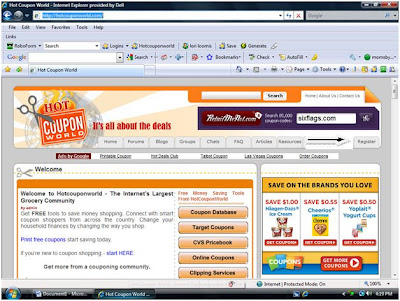
For beginner couponers who want to get on the fast track to becoming a money saving expert, your first stop should be Hot Coupon World. This forum is filled with couponing pros from across the country sharing tips and deals for dozens of stores. They also have an excellent coupon trading forum which we will discuss in a future post.

The easiest way to go through this tutorial is to open a second window and follow along on hotcouponworld.com. If you’re not already a member, you’ll want to begin by registering HERE.
My two favorite features are the Forums and the Coupon Database. We’ll begin by discussing the Forums. Click on the tab shown by the black arrow to access this part of the site.


Forums exist to give couponers a place to discuss current deals, ask questions, learn the ropes and share experiences with each other. They are grouped into categories:


~Greetings & Getting Started
~Swingin’ Deals
~Free Deals
~Show Me The Deals
~Happy Holidays
~Forums For Trading: Share The Wealth

Within each of these categories, you’ll find relevant discussion threads. Here is what the GREETINGS & GETTING STARTED forum looks like:


This forum is where you’ll find the Hot Coupon Rules, Couponing Basics tutorials and the Trader In Training Program. Trading coupons is the best and most affordable way to grow your stash, and this program is intended to help “get your feet wet” in the trading world so you learn how it works. Your first trades will be under the supervision of a moderator who will be there to help you every step of the way. Very often you’ll be able trade for peelies, tearpads, hangtags, rebate forms and other hard-to-find stuff. Here’s a pic from one of my favorite HCW trades:


I’ll cover the basics of trading in a later post. For now, the best way to learn is to take some time and look around this section of the forum.

Next, we’ll look at the forum category called Swingin’ Deals:


My favorite.

Here you’ll find the latest and greatest deals, clearance items and unadvertised bargains for just about every store under the sun brought to you by fellow HCWers! Wanna know what’s been spotted on clearance at CVS? Looking for a JoAnn’s Fabric printable coupon? You’ll find it here! Take a few minutes and look around this section so you know what’s available.

Next, scroll down until you find Forums For Trading: Share The Wealth.


Once you’ve completed the trader in training program, this will be one of your favorite spots. You’ll find:
~Coupon auctions
~Items up for trade
~Coupon Trains
~Classified ads
~Trading rules
And lots more.


Even if you’re still a Trader In Training, it will help you learn the ropes to see what is available and how folks are trading here.

Now, on to the Coupon Database. This is by far the most comprehensive database of coupons around. If a coupon exists for a particular item, chances are it’s listed here. To view the page below, click on the Coupon Database link shown with the black arrow:


You’ll see several tabs:
• Search (in orange)
• Have List
• Keep List
• Wish List
• Trades (Actual and Potential)

For now, we’ll discuss the Search feature, since the other four pertain to trading. You’ll see a Description box shown by the red arrow. Type in the name of the product you are seeking a coupon for and the results will be shown below it. As an example, in the screenshot below I’ve typed in a search for Kingsford Charcoal. I’ve also indicated that I’d like to see only insert coupons for this product. You can see the results show expiration date, insert date/type along with a description of the coupon. If I wanted to find a printable coupon for this product, I’d change the Source option to Printables. Easy as that, you can find out how and where to get the coupons you need!


Thanks goes to HCW for allowing me to use these screenshots and of course, for helping me save so much moolah! Be on the lookout for the next tutorial, which will explain the HCW trading system!

Where is that Coupon?

A few times a week I get an email asking me why a coupon I listed for an item is not in their Sunday (Smart Source, Red Plum) insert. The reason why this happens is coupons are REGIONAL. Larger cities get bigger, better, and more coupons while rural areas hardly get any. Some cities even were affected by the Red Plum pull and don't get any of those inserts. I live in a city that has a nice amount of coupons but I am regularly missing a coupon. I am here to prove that you CAN do it even with these missing coupons. The coupons will come eventually. If you are in need of a coupon and cannot wait longer, always remember you can order the coupons you that you don't get in your Sunday inserts at The Coupon Clippers by clicking the icon below.

The Coupon Clippers

Thursday, September 3, 2009

Around the Blogosphere

Mama Cheaps has information on FREE Admission to Medieval Times during your Birthday month Here or Get a FREE Sample of Exderm Intensive Here.
.
For the Mommas has a $1 coupon on Nestle Cookie Dough Here.
.
More than Cents has information on how you can save $10 on the newest Snow White Movie Here.
.
A Thrifty Mom tells you how to get a FREE mouse pad at CVS Here.
.
Nicole's Nickels share with you how to get a FREE personalized card shipped to your desired address Here.
.
For the Mommas shares how to get Bear Naked Cereal for FREE Here.
.
New to Couponing? My Frugal Adventures has a list of Acronyms you need to know when couponing Here.

Mojo Savings has a link for a 50% coupon to Boston Market for a family feast - Labor day weekend only Here.

Coupon Saving Game found an upcoming MONEYMAKER at Walgreens Here.

Monday, August 3, 2009

Where is That Coupon?

A few times a week I get an email asking me why a coupon I listed for an item is not in their Sunday (Smart Source, Red Plum) insert. The reason why this happens is coupons are REGIONAL. Larger cities get bigger, better, and more coupons while rural areas hardly get any. Some cities even were affected by the Red Plum pull and don't get any of those inserts. I live in a city that has a nice amount of coupons but I am regularly missing a coupon. I am here to prove that you CAN do it even with these missing coupons. The coupons will come eventually. If you are in need of a coupon and cannot wait longer, always remember you can order the coupons you that you don't get in your Sunday inserts at The Coupon Clippers by clicking the icon below.


The Coupon Clippers

Wednesday, July 15, 2009

It Saves to Coupon - My Husband verses Me!

*Please read the first comment below, let it be known and written - I am in charge of shopping now! You all are my witnesses!
.
I KNOW from your emails and great shopping stories most of you don't need me to prove to you why it saves to coupon but I had to share this example of why it saves to coupon.
.
I told you about my husband buying full priced pain medicine Here. I didn't tell you that he also stopped by Wal-Mart earlier last week to buy another bottle of pain medicine (he had left that one at home when we traveled.) I could have strangled him. Two bottles of pain medicine for two ridiculous prices!Now being fully aware that when he has a headache he does not have a stockpile of medicine, I took it upon myself to go to Walgreens today. Luckily, he isn't picky about what brand I buy when I buy medicine for pain so I went with another brand - one on sale, one with a promo, and one with a coupon (remember, you cannot be brand loyal to maximize your savings.)
.
Compare how much I spent to how much my husband spent.

My Husband's Spending
Aleve $7 - 20 pills
(no sale, no coupon)
= $7 ($.35 per pill)
.
My Spending
Excedrin $6.99 (regular price $10.99) - 100 pills (get $5 RRs from Walgreens wyb 2)
$1 coupon (you can get one in your 7/12 SS insert for $1 or $2, $1.50 in June All You Magazine, or print one Here, Here, or Here.)
= $5.99 x 2
= $11.98
$11.98 - $5 RRs = $6.98 (notice, I already spent less than him and have gotten 10xs the pills - $.03 per pill.)
.
So we would have bought the pain medicine anyway, I just bought it at the right time.
Normally, I would buy this when we have these sales but I didn't realize his stockpile was out -being pregnant or nursing for 2 years I am not taking much pain medicine.)
.
*Note: The RR did not print out when I bought my Excedrin, the manager had to come over to help me. Also, the Excedrin is on sale this week for the 100 count but the $5 RR promo runs until the end of July. It is not found in the weekly flyer.)

Saturday, May 9, 2009

Walgreens RRs

-See Follow Up Post Here-
PLEASE READ CONCERNING WALGREENS RRS
I have gotten dozens of emails lately about people using RRs and not getting RRs back at Walgreens. This should not be the case (according to what I know) so I cannot understand why it is happening to a select few of you. I have called corporate, to ask them the question, and have YET to receive a phone call back. So while I wait, if anyone has advice, please leave a comment below. Embarrassingly enough, I HONESTLY have not had the time to set foot in a Walgreens store in a few weeks now so I cannot troubleshoot the situation myself. A lot of you are telling me that the managers are telling you this is a new policy... if this is the case, there is another thing Walgreen is taking away and that makes me disappointed.
.
Remember, you cannot use RRs from an item to buy the same item again and get back RRs. You should, however, be able to use RRs to get more RRs back as long as the items are different.
As always, if you think you should have gotten RRs that did not print, please call the Catalina company to inquiry why. They will be able to answer why.
1-888-826-8766. Option 3 is for consumers.
You can also call Walgreens but you will either get someone who is immediately able to help you or wait on a phone call back as long as I have.
.
Right now, my advice is to use your RRs to buy non RR items so you don't have to worry about loosing the deals.
.
Additional Note: Moms by Heart writes "- You can never use a RR to get a RR for the same product - or for any other product made by the same manufacturer. In the above example, I couldn't take my $10 RR, buy more Robitussin and get another $10. Also, I couldn't use that $10 to purchase something else made by the manufacturer of Robitussin and get more RR's. Be sure if you are "rolling" your RR's into another deal you know who the manufacturers are!" You can see her post Here.

Thursday, April 30, 2009

Frugal Coupon Living - Daily Emails

I have had a number of readers share with me that they are getting their emails a day late. The way Feedburner works is it compiles the previous day's posts and sends you the content I shared for that day in an early morning email. For example, everything I wrote on Monday, April 27th will arrive in your email inbox Tuesday, April 28th. This bothers some people when it comes to Redbox codes or one day only deals. I work hard to get the deals out to you BEFORE it is the last minute but some deals just come up at the last minute (like Redbox codes.) My advice is check the post each day (especially on Monday's if you want Redbox codes.) I hope, however, that 90% of the content reaches you in time (if you are an email only reader.) I subscribe by email to a number of websites, and there are always perks (not having to visit the website each day) but there are always cons (late content.)
.
Thanks for understanding.
If you are intersted in subscribing to emails, you can register on the right column of my blog (under the coupons.com printable coupons.)

Monday, April 13, 2009

What if My Cashier Didn't Ring a Coupon?


I have had a couple of questions about this recently. One most recently today which I found ironic because the VERY thing happened to me today. I had two $.55 coupon and the cashier only rung one. I called the store and asked them what I should do. She said that next time I come into just bring my receipt to the front and let them know.
.
My advice to You
1) Don't look for missing coupons when you get home, do it in the car at the parking lot of the store you just were in. Remember, Staci's guest post Here.
2) If you do wait until you get home, call the store right away and ask them what you should do. Be willing to give your cashiers name (usually on the receipt) and the location of the register. This IS NOT to get them in trouble but to help the store locate your coupon.
3) Follow up with their directions.

Wednesday, April 8, 2009

The Coupon Fairy

Have you been visited by the coupon fairy?
I was so excited to get a visit this morning when I was doing my CVS/Walgreens/Publix runs (yep, all in one day!) The coupon fairy is a a kind soul that leaves a coupon on the shelf next to the item for which the coupon is good. This morning, when I was buying Cottonelle wipes, I expected to pay $1.74...however, thanks to the coupon fairy, I only paid $.99 (she/he left me a $1 coupon.) Thanks, coupon fairy!

Saturday, April 4, 2009

Sale + MFR + SC = A GREAT SAVINGS!

I am getting a lot of questions about why I use many MFRs (manufacture coupons) per transaction. It is true, you can ONLY use one MFR per transaction.
.
The best scenario is always to use a sale + a MFR + a SC (store coupon.)
.
Let's look at one scenario below of doing just this.
.
Schick Disposable Razors $6.99 - A Sale
$1 SS 3/8 - A MFR
$3 SS 3/8 - A MFR
B1G1 SS 4/5 - A MFR
$2
April IVC (page 9) - A SC (Walgreens Instant Value Coupon)
= $1.50 - $3.99 each - my total in a range
.
I have had a few emails about why I used 3 MFRs during this transaction. I didn't. I most likely used the $3 coupon (if I had it.) If I didn't have it because I already used it, or never got it, then I have 2 other coupons I can choose from. When I list my coupons, I am not sharing with you all the coupons I am using, I am sharing with you all the coupons that EXIST so you can choose what could works for your family. This is why my grand total has a range. The grand total depends on what coupon combination you choose.
.
I hope this helps clear any confusion. If not, please comment below and I will be more than happy to answer your question.

Friday, March 27, 2009

Strategies for Knowing if All of Your Coupons Were Scanned

Below is a guest post from Staci. Staci is a stay at home mom of 4 adorable children under the age of 4 (making a family of 6.) Staci's home has organic food, very little meat, and incredibly healthy diet. She spends a little over $100 (each month) on groceries and saves an incredibly amount of money!!! While Staci spends very little, she is still able to come home with products that cost very little to nothing (to even moneymakers) to donate to others.
.
You can see a previous guest post of her's Here, on ways she gives back to the community.

Strategies for Knowing if All of Your Coupons Were Scanned
.
If shopping with kids, you might want to waiting until you are in the car and the kids are relatively calm (I often shop with my four kids who are four and under). I have tried checking the receipt in the lobby, but usually the kids get antsy and I can't think straight.
.
Once in the car, my strategy is to look at the coupons section on my receipt and count and separate each group of coupons with different pen marks. For example, last time I was at the store, I bought 10 boxes of cereal with 2 different coupons each: one manufacturer and one competitor, so I made sure they had scanned all twenty of these coupons. Then, I did another deal with two coupons each, so I made sure they had scanned the two coupons for each deal (4 total coupons). I repeat this process until I have covered all of the coupons. This systems requires knowing how many different types of coupons you have and the total number of each type.
.
Other potential ways to figure out if they have scanned your coupons is to either count the number of total coupons and/or add up the total savings with coupons and make sure these match your receipt. The potential downside is that it would be harder to figure out which specific coupon did not scan, which makes getting your money back mo re challenging.
.
If you are getting only stuff for which you have coupons and you know all of the prices of your items, you can calculate your expected total grocery bill. This strategy works well if you are buying a minimal amount of different types of items. The problem with this strategy is often that the prices are a little different than expected, but it does help to have a ballpark figure if you have the time.
.
If you do find a problem, go to customer service and let them know that they missed one of your coupons. I frequently find problems and always get reimbursed at Publix (sometimes after a lot of patience). One time, they missed a dollar off coupon, and once reimbursed, I bought six more cans of tomato sauce using that dollar and a combination of sales and coupons.
.
If you are at a drug store with a smaller transaction, you can always offer to return everything and buy the items again using the coupons that you had intended to use.
.
Thanks, Staci for sharing your tricks!

Tuesday, March 17, 2009

How Do I Leave a Comment?

At the bottom of each post is smaller font. Located in this smaller font region is the time the post occured and the number of comments thus far. (i.e. 8:00 AM 2 Comments.) In order to leave a comment, click on the word comments. This will direct you toward the comments page. There will be a text box (usually located below the previous comments) where you can leave a comment of your own.
.
You do need a certain account to sign up. I tell my reader to sign up for a google account and to use the google account as your junk email address for couponing.
.
I hope this clears up any confusion.